

Download MD5 SHA Checksum Utility – Free, Secure File Integrity Checker for Windows & Mac
The MD5 SHA Checksum Utility is a lightweight, portable tool developed by Raymond Lin designed to help users verify the integrity of digital files using industry-standard hash functions. Whether you're downloading software, firmware, or sensitive documents, ensuring that your file hasn't been altered or corrupted is crucial. This utility supports multiple hash algorithms including MD5, SHA-1, SHA-256, and SHA-384, allowing you to cross-verify checksums with official release data.
With its simple drag-and-drop interface, even beginners can generate and validate hashes in seconds. The app runs without installation—ideal for use on USB drives or shared computers—making it a go-to solution for IT professionals, developers, and everyday users alike. It’s completely free, secure, and regularly updated for compatibility and performance.
If you're looking for a reliable way to check file integrity, this free checksum tool is an excellent choice.
Key Features of MD5 SHA Checksum Utility
The MD5 SHA Checksum Utility stands out in the crowded field of file integrity tools due to its simplicity, speed, and robust feature set. One of its most powerful features is its support for multiple cryptographic hash functions—MD5, SHA-1, SHA-256, and SHA-384—giving users flexibility depending on their security needs. While MD5 and SHA-1 are faster, they are no longer recommended for high-security applications due to known vulnerabilities. SHA-256 and SHA-384, on the other hand, offer stronger cryptographic guarantees and are ideal for verifying software downloads from trusted sources. The tool allows you to generate a hash signature for any file with just a few clicks, making it perfect for validating software packages, ISO images, or encrypted archives.
Another standout feature is the portable nature of the application. Unlike many other tools that require installation and leave behind registry entries or temporary files, MD5 SHA Checksum Utility runs directly from a USB drive or local folder. This makes it ideal for use on public computers, during system recovery, or when you need a lightweight tool on the go. The interface is clean and intuitive—no complex menus or confusing options. Simply drag your file into the window, select the desired hash algorithm, and click "Generate." The result appears instantly, ready to be compared with the official checksum provided by developers.
Additionally, the utility supports batch processing, allowing you to verify multiple files at once. This is especially useful for system administrators managing large software deployments or users downloading entire software suites. The tool also includes a built-in comparison function that highlights mismatches between the generated hash and the expected value, reducing the risk of human error. With no ads, no telemetry, and no hidden costs, this tool remains one of the most trusted options for file verification across Windows and Mac platforms.
How to Install and Use MD5 SHA Checksum Utility
Installing and using the MD5 SHA Checksum Utility is refreshingly simple—there’s no traditional installation process. To get started, visit the official developer’s website or a trusted download source and download the latest version of the tool. The file is typically a single executable (e.g., MD5SHA.exe) and is completely portable.
Once downloaded, extract the file to any folder on your computer—your desktop, documents, or even a USB drive. That’s it. No setup wizard, no system changes, no need to restart your PC.
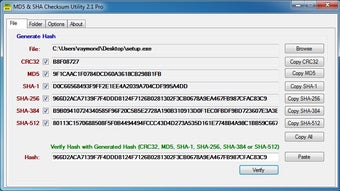
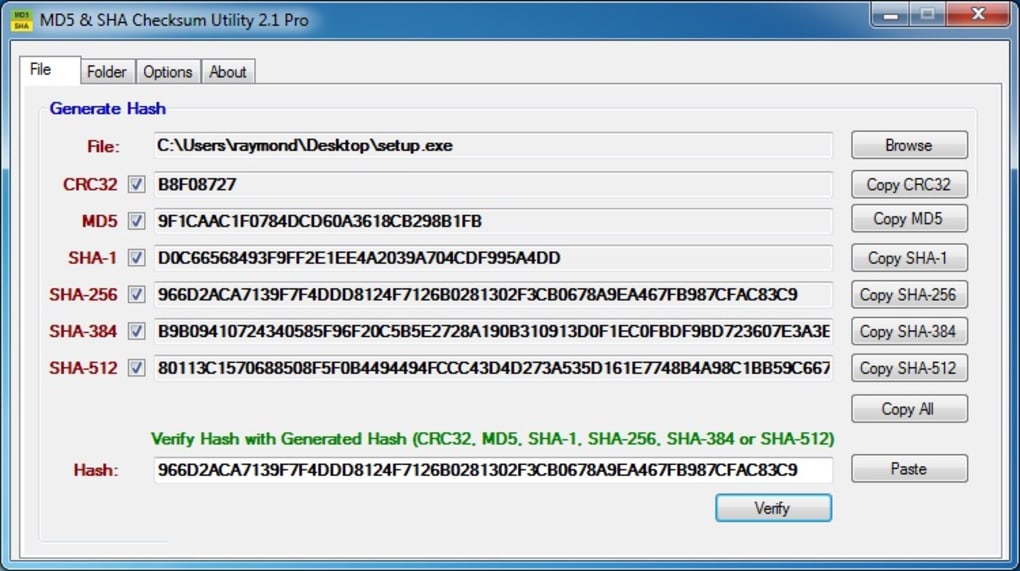
Once you’ve extracted the file, simply double-click the executable to launch the utility. The interface is minimalistic: a central window with a file drop zone and a list of hash algorithms. To verify a file, drag and drop it into the designated area, or click the "Open File" button to browse your system.
After selecting the file, choose the hash algorithm you want to use from the dropdown menu—MD5, SHA-1, SHA-256, or SHA-384. Click the "Generate" button, and the tool will compute the hash in milliseconds. The result appears in a clean, readable format, often displayed in hexadecimal.
To verify the file’s integrity, compare this generated hash with the official checksum provided by the software publisher. If they match exactly, your file is authentic and unaltered. If not, the file may have been corrupted during download or tampered with. For advanced users, the tool also allows you to save the generated hash to a text file or copy it to the clipboard for easy sharing. This makes it perfect for documentation, audits, or sharing verification results with support teams.
Compatibility and System Requirements
The MD5 SHA Checksum Utility is designed to be highly compatible across modern operating systems. It runs seamlessly on Windows 7, 8, 10, and 11 without requiring elevated privileges. The tool is also compatible with macOS versions from macOS 10.14 (Mojave) onward, thanks to a native build that ensures optimal performance and security. For users on older systems, it’s recommended to check the official release notes for specific compatibility details.
As a portable application, it doesn’t require any additional software or runtime libraries. This means you can run it on any machine with a compatible OS, even if it’s locked down or lacks admin rights. This makes it ideal for use in corporate environments, educational institutions, or public computer labs. The tool is lightweight, consuming minimal RAM and CPU resources—typically less than 10 MB of memory and negligible processing power—ensuring it doesn’t slow down your system.
For mobile users, while there is no official Android or iOS version, the tool can be used in conjunction with remote desktop apps or cloud-based virtual machines to verify files on the go. Developers and IT teams often use it in automated scripts or CI/CD pipelines when combined with command-line utilities. The developer, Raymond Lin, maintains the tool regularly, releasing updates to fix bugs, improve performance, and ensure compatibility with new OS versions. The consistent updates and community feedback loop reflect the tool’s reliability and long-term viability.
Pros and Cons of MD5 SHA Checksum Utility
- Pros:
- Free and open to all users with no hidden costs
- Portable—no installation required, ideal for USB drives
- Supports multiple hash algorithms: MD5, SHA-1, SHA-256, SHA-384
- Simple, intuitive interface suitable for beginners
- Fast hash generation with minimal system resource usage
- Batch processing for multiple file verification
- Regular updates and active developer support
- Secure—no telemetry, no ads, no third-party tracking
- Cons:
- Limited to desktop platforms (no native mobile version)
- Basic UI—lacks advanced customization options
- No built-in checksum database or auto-download feature
- MD5 and SHA-1 are cryptographically weak (use with caution)
- Minimal documentation beyond basic instructions
Frequently Asked Questions (FAQ)
- Is MD5 SHA Checksum Utility free to download and use?
-
Yes, the MD5 SHA Checksum Utility is completely free to download, use, and distribute. There are no premium features, subscriptions, or hidden fees. The tool is open to all users, including individuals, developers, and enterprises.
- Can I use this tool on Mac and Linux systems?
-
Yes, the utility is compatible with macOS 10.14 and later. While there is no official Linux version, users can run it via Wine or through a compatible environment. For best results, use the native macOS build available from the developer’s site.
- How do I verify if my downloaded file is authentic?
-
First, download the official checksum (MD5, SHA-256, etc.) from the software publisher’s website. Then, use the MD5 SHA Checksum Utility to generate the hash of your downloaded file. If the two values match exactly, your file is authentic and unaltered.
- Why should I use SHA-256 instead of MD5?
-
MD5 is considered cryptographically broken and vulnerable to collision attacks. SHA-256 offers much stronger security and is widely used for software verification. For high-security use cases, always prefer SHA-256 or SHA-384 over MD5 or SHA-1.
- Does the tool support batch verification of multiple files?
-
Yes, the utility supports batch processing. You can select multiple files at once and generate checksums for each, making it efficient for verifying large software packages or system backups.
Final Verdict: A Must-Have Tool for File Verification
The MD5 SHA Checksum Utility is a reliable, lightweight, and secure tool for verifying file integrity across Windows and Mac systems. Its portability, ease of use, and support for multiple hash functions make it an essential addition to any digital toolkit. Whether you're a developer validating software builds, a system administrator deploying updates, or a regular user ensuring your downloads are safe, this tool delivers consistent, accurate results.
While it lacks advanced features like auto-downloading checksums or mobile support, its core functionality is flawless. With no ads, no tracking, and a commitment to transparency, it stands out in a market filled with bloated or monetized alternatives. For anyone seeking a free, secure, and portable checksum utility, this is the top choice.
Download MD5 SHA Checksum Utility today and take control of your file security with confidence.







